ip
Duke User Guide
Duke is a an optimized Command Line Interface (CLI) application used for managing tasks .
Quick Start
- Ensure you have Java
11or above installed in your computer. - Download the latest
Duke.jarfrom here. - Move the file to the folder you want to use.
- Open a command-line interface and navigate to folder you have chosen. You should see the
Duke.jarfile. - Type
java -jar Duke.jarto run the program. The program should start up in a few seconds and show: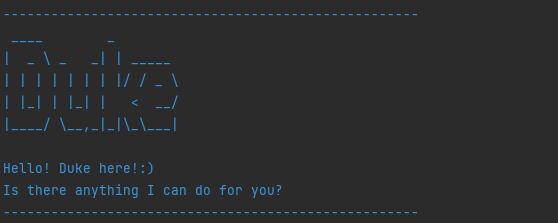
- Enter the commands you wish to execute and start managing your tasks!
- Refer to Command Summary below for details of each command
Command Summary
| Commands | Format, Example |
|---|---|
| list | list To list the items |
| delete | delete [TASK INDEX] e.g delete 2 To remove the second task on your list |
| mark | mark [TASK INDEX] e.g mark 2 To mark the second task on your list as done |
| unmark | unmark [TASK index] e.g unmark 2 To unmark the fourth task on your list |
| todo | todo [DESCRIPTION] e.g todo work To add a todo task. |
| event | event [DESCRIPTION] /at [DATE] e.g event attend class /at Monday 6pm To add a event task. |
| deadline | deadline [DESCRIPTION] /by [DUE DATE] e.g deadline project /by Tuesday To add a deadline task. |
| find | find [KEYWORD] e.g find lecture To find tasks according to the keyword. |
| bye | bye To exit the program. |
Features
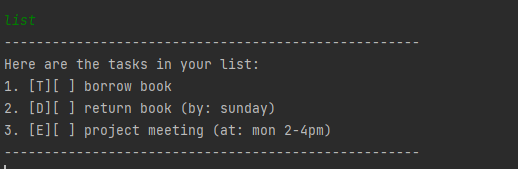
Lists all tasks: list
Lists all the tasks in the task list.
Format: list
Example:
Delete a task in the list: delete
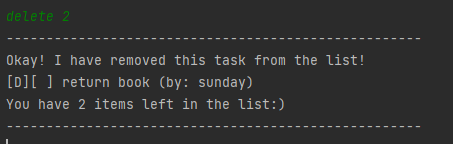
Deletes a specific task in the list using the index specified.
Format: delete [TASK INDEX]
Example: ‘delete 2’ - To delete second task in the list.
Mark a task as done: mark
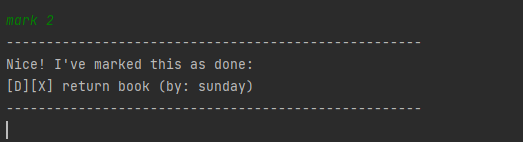
Marks a specific task in the list as done using the index specified.
Format: mark [TASK INDEX]
Example: ‘mark 2’ - To mark second task in the list as done.
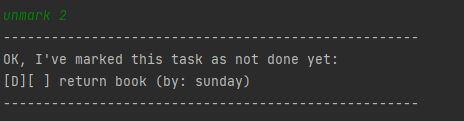
Unmark a task on the list: unmark
Unmarks a specific task in the list as not done using the index specified.
Format: unmark [TASK INDEX]
Example: ‘unmark 2’ - To unmark second task in the list as not done.
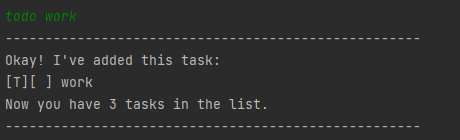
Add a ‘todo’ task: todo
Adds a todo task to the list. No date/time is required for this command.
Format: todo [DESCRIPTION]
Example: ‘todo work’ - To add a todo work task to the list.
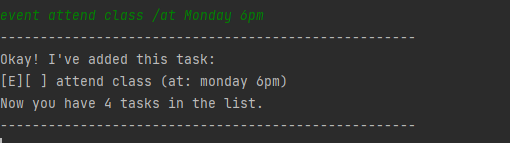
Add an ‘event’ task: event
Adds an event task to the list. Date/time is required for this command.
Format: event [DESCRIPTION] /at [DATE]
Example: ‘event attend class /at Monday 6pm’ - To add an event at Monday 6pm task to the list.
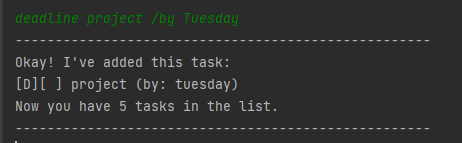
Add a ‘deadline’ task: deadline
Adds a deadline task to the list. Date/time is required for this command.
Format: deadline [DESCRIPTION] /by [DATE]
Example: ‘deadline project /by Tuesday’ - To add a project with deadline by Tuesday task to the list.
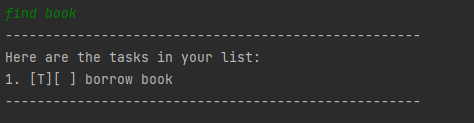
Find tasks in the list: find
Finds all the tasks that contains the keyword given.
Format: find [KEYWORD]
Example: ‘find book’ - To find tasks that have the keyword ‘book’ in it.
Exit the program: bye
Exits the program. All tasks added will be saved in the hard disk.
Format: bye
Example:
